To get good GPS reception, mount the antenna where it can “see” as much open sky as possible.
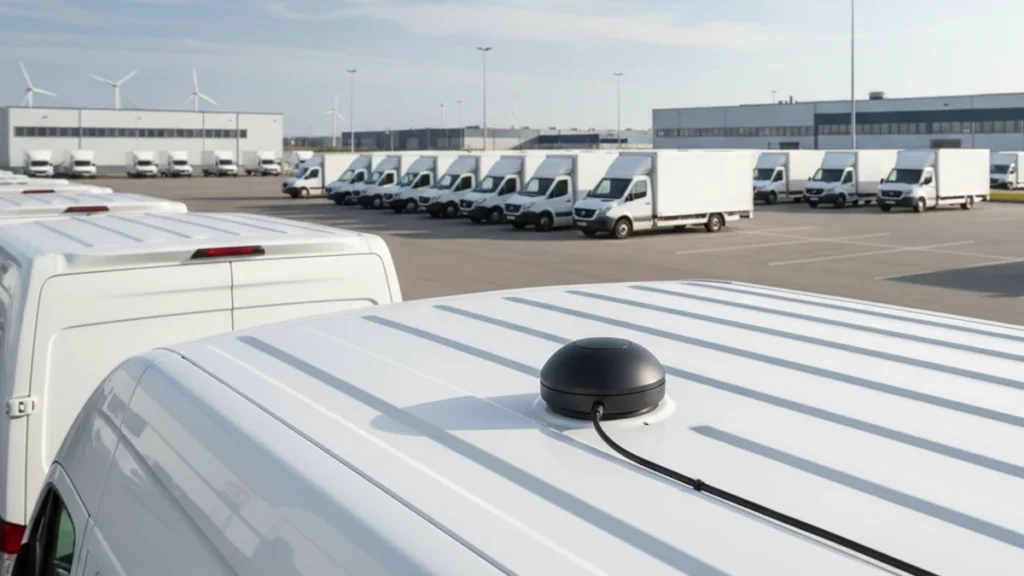
- Best spot: on the outside roof, ideally near the center. Fewer obstacles means faster lock and more stable tracking.
- If it must go inside: place it on top of the dashboard near the windshield. Avoid windshields with metal coating / heat-reflective film, which can block GPS.
Avoid mounting the antenna:
- under metal panels or inside metal boxes
- behind large metal objects
- upside down, covered, or next to strong electronic interference
In short: more open sky + less metal above the antenna = better GPS performance.
This guide covers antenna types and mounts, best mounting locations (including by vehicle type), cable routing and interference, grounding, step-by-step installation, an acceptance checklist, troubleshooting, and FAQs. Jump straight to what you need:

Antenna Types and How They Change Your Mounting Choice
Active vs. passive
- Active antennas have a built-in LNA and draw power from the receiver’s antenna port (phantom power) or an external supply. That amplification compensates for longer cable runs.
- Passive antennas need no power but are far more sensitive to cable loss — keep the run short (roughly under 1–2 m) or accept a weaker signal at the receiver.
- Rule of thumb: past about 3 m of cable, or if you’re unsure, use an active antenna. Under ~1 m on a good cable, passive is usually fine.
Patch vs. helix (mushroom/rod-style)
- Patch (ceramic/microstrip) antennas radiate mainly straight up — they need to sit flat and face-up. Tilt one and gain drops quickly, so patches are the most "picky" about orientation.
- Helix/mushroom-style antennas have a rounder, more hemispherical pattern and tolerate some tilt or a curved, non-horizontal surface better.
Magnetic vs. 3M adhesive vs. screw/through-hole
- Magnetic: fastest to install and remove, needs a flat ferrous metal surface, and doubles as a ground plane — but can shift at highway speed if the surface is dirty or curved.
- 3M adhesive: works on glass, plastic, or composite panels; more permanent and harder to service — removal often damages the tape or paint.
- Screw/through-hole: the most secure and vibration-resistant option, best for trucks and permanent fleet installs; requires drilling and a properly sealed gasket, and is the hardest to relocate later.
PRODUCT OPTIONS
Compare options for your installation
Check the operating band, connector and installation space before selecting a model.
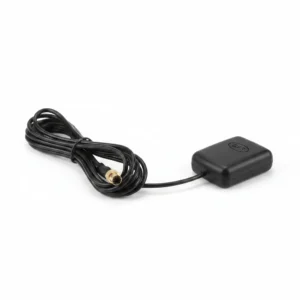
GL-DY006F
GPS antenna for magnetic or adhesive installation.
- Band
- 1575.42 ±1 MHz
- Connector
- FAKRA C blue female
- Mounting
- Magnet or adhesive
Best mounting locations, in order
- Center of a metal roof (exterior). Best signal. Open sky in every direction, and the roof acts as a ground plane for a magnetic-mount antenna.
- Roof rack, cab roof, or trailer top. Same sky view; good for trucks and fleet.
- Top of the dashboard, against the base of the windshield (interior). Works for many cars — but only if the windshield is not metal-coated (see the athermic glass warning below).
- Rear parcel shelf under the back window. Acceptable if the glass is clear and unobstructed.
- Anywhere with metal above it. Worst. Under a metal roof, inside a trunk, or beneath the dash, the antenna cannot see satellites.
The pattern is simple: more open sky and less metal overhead means a faster, more stable fix.
Why location decides everything
GPS satellites are low-power and far away. The antenna needs a clear, wide view of the sky to receive enough of them for a position fix — and the more sky it sees, the faster it locks and the better it holds the fix while the vehicle moves through cities and under trees. Metal blocks these signals completely. A few centimeters of steel between the antenna and the sky is the difference between a solid lock and a dead receiver. That is why exterior roof mounting beats every interior option, and why "hidden under the dash" is the most common reason an install fails.
Installation Guidance by Vehicle Type and Situation
- Sedans/cars: roof or dash-front mounting both work well; short cable runs mean passive antennas are usually fine.
- SUVs and vans: roof height and rear glass angle can change line-of-sight; roof-center is still preferred, but a longer run to a rear-mounted receiver may call for an active antenna.
- Trucks and trailers: mount on the cab roof for the tractor’s own GPS; for trailer tracking, mount on the trailer roof and treat the tractor-trailer gap as a permanent connector break — use a sealed connector pair and expect the two systems to disconnect when uncoupled.
- Windshield coating check: many modern windshields use a metal-coated ("athermic," solar-control, or heated) layer that blocks GPS. Check the owner’s manual for terms like athermic, solar control, heat-reflective, or heated windshield. Some of these glasses have a small uncoated "window" near the mirror — mount there if present, otherwise go external.
- Underground garages, elevated highways, urban canyons: expect a degraded or lost fix here regardless of antenna quality — it’s a sky-visibility limit, not a product defect.
Good vs bad locations at a glance
| Location | Result | Notes |
|---|---|---|
| Center of metal roof (exterior) | Best | Full sky view; roof = ground plane for magnetic mount |
| Roof rack / cab / trailer top | Very good | Ideal for trucks and fleet |
| Dash base by windshield (interior) | Good — if glass is clear | Fails behind athermic/heated glass |
| Rear parcel shelf | OK | Needs unobstructed rear glass |
| Under the dash / inside trunk | Poor to none | Metal blocks the sky view |
| Next to a cellular/radio antenna | Degraded | Interference desensitizes the receiver |

Two traps that quietly kill GPS
Metal roof + interior mount. If the antenna is inside the cabin under a steel roof, it cannot see up. For a metal-roof vehicle, mount externally (magnetic mount uses the roof as a ground plane) or find a glass area with clear sky.
Athermic / heated windshields. Many modern vehicles use metal-coated ("athermic," solar-control, or heated) windshields. That coating blocks GPS just like sheet metal, so a dash-mounted antenna behind it gets a weak or no fix. Some windshields have a small uncoated "window" near the mirror for exactly this reason — mount there, or go external. If a dash mount that worked in an old car fails in a new one, suspect the glass.
Cable and Connectors: The Second-Biggest Source of Failure
Cable length vs. loss
- Longer cable means more signal loss at GPS/GNSS frequencies. As a guide: runs under ~3 m are usually fine with a passive antenna and standard coax; runs over ~5 m should move to an active antenna, and consider a lower-loss cable instead of thin RG174-style cable for runs over ~10 m.
- For a long run, switching to an active antenna is usually more cost-effective than sourcing premium low-loss cable — combine both for very long runs.
Connector matching and adapters
- Common types: SMA, MCX/MMCX, and Fakra (the automotive standard). Match the antenna and receiver connector directly whenever possible.
- Every adapter or barrel connector in the chain adds a bit of loss and a new point that can corrode or make poor contact. Two or more stacked adapters is a frequently overlooked cause of intermittent signal.
Bend radius and pinch points
- Keep bends gentle, especially near the connector — tight bends there are a common failure point.
- Watch the classic "chronic damage" spots: A-pillar trim (flexed each time panels are removed), door jambs (crushed every time the door closes), and footwell/pedal areas (foot traffic, sharp edges). Add grommets or padding at any pass-through.
Electromagnetic Interference (EMI) and Spacing Guidelines
- Keep distance from other transmitting antennas — cellular (4G/5G), two-way radios, Wi-Fi, and mobile/CB radio. A conservative separation of roughly 30–50 cm (12–20 in) is a reasonable rule of thumb; closer spacing risks desensitizing the GPS front end, especially near high-power two-way radios.
- Route cable away from in-cabin noise sources: ignition coils, inverters, DC-DC converters, and electric motors/pumps, which radiate broadband noise that can raise the receiver’s noise floor.
- A "weak signal" isn’t always blockage — a desensitized or overloaded front end from a nearby transmitter or noisy cable run produces the same slow-lock, dropped-satellite symptoms. If moving to open sky doesn’t help, suspect interference next.
Grounding, Ground Plane, and Mounting Surface
- A magnetic-mount antenna performs best on a metal roof because the panel acts as its ground plane, effectively enlarging the antenna’s electrical aperture and improving low-elevation reception — this is why the same antenna does noticeably worse on glass or plastic.
- On glass or plastic: add a metal ground plane / counterpoise plate under the antenna base. A round or square plate roughly 10–15 cm (4–6 in) across is a reasonable starting point for most patch antennas (check the antenna’s datasheet if one is given). Keep it flat and center the antenna on it.
- Fiberglass roofs / non-metal bodies (RVs, vans, construction or ag equipment): don’t rely on the body for a ground plane. Choose an antenna with a large built-in ground plane, or add an external plate sized as above.
How to install it: step by step
- Pick the spot with the most open sky and the least metal above it, using the order above.
- Clean the surface so a magnetic or adhesive mount seats fully — signal aside, a loose antenna fails mechanically.
- Mount the antenna face-up, horizontal. GPS patch antennas are designed to look at the sky; tilting them sideways reduces the satellites they see.
- Keep it clear of other antennas and transmitters. Mounting right next to a cellular or two-way radio antenna can desensitize the GPS receiver. Give it some separation.
- Route the cable away from noise sources (ignition, alternator, inverters) and avoid sharp bends or pinch points.
- Confirm the lock. Power up and check time-to-first-fix and satellite count before finishing the cable run.
The installation method described above is a general guide. In which situations would one ‘deviate from this method’?
Factory-fitted integrated antennas: On many vehicle models, the GNSS antenna is integrated into the shark fin, windscreen or roof module as standard, so users will not see the process of ‘attaching a small antenna’.
Devices that are not ‘standalone GPS antennas’: For example, with some dashcams, OBD units or in-car navigation systems, the GNSS antenna may be built into the device itself; you simply need to position the entire unit in a suitable location.
Special vehicles or scenarios: For instance, vehicles with fibreglass roofs, construction machinery, trailers, shipping containers or those with significant metal shielding may require a higher mounting position, an external bracket, or a more suitable antenna or cabling solution.
Which category does yours fall into?
A separate GPS antenna (magnetic mount/adhesive mount/screw-mounted) + wired connection to the device: Essentially, follow the guidelines set out in this article (prioritise the roof, followed by the area near the windscreen).
The device has its own built-in antenna: Simply position the device so that it is ‘as close as possible to a glass surface or an unobstructed view of the sky’.
You can let me know in the comments section: your device model and antenna type (magnetic, 3M adhesive, screw-mounted, built-in), plus whether you intend to install it inside or outside the vehicle. I can then reply with more specific recommendations on the best location and how to avoid common pitfalls.
Alternatively, you can simply click on the table of contents on the left to go to the FAQ section and find the answer to your question; this section covers most of the frequently asked questions about in-car antennas.
Also, if you require a reliable GPS antenna, please feel free to contact us.
Weatherproofing and Mechanical Reliability (Essential for Exterior Mounts)
- Look for an adequate IP rating (IP65+ is a common baseline for exterior automotive use), a sealed radome, and a gasket or grommet at the cable entry point.
- For screw/through-hole mounts, seal the mounting hole itself, not just the antenna body — this is the most common source of slow water ingress.
- Expect UV and salt-fog exposure to age radomes and connectors over years outdoors; corrosion-resistant hardware lasts longer in coastal or winter road-salt regions.
- Exterior antennas take mechanical abuse from car washes, low branches, and highway wind pressure — magnetic mounts can shift at speed on a surface that isn’t clean and flat, while screw mounts hold up best under repeated stress.
Compliance and Safety Notes
- Never mount the antenna where it blocks the driver’s field of view.
- Avoid airbag deployment zones — the A-pillar and front passenger dash area are common trouble spots; check the vehicle’s airbag zones before drilling or taping there.
- Route cable away from pedals and the steering column, and secure it fully — a pinched or loose cable near these areas is a chafing and short-circuit risk.
Acceptance Checklist: How to Know the Install Is Good
- Cold-start TTFF: roughly 30–60 seconds in open sky; can stretch to a few minutes in a dense urban canyon or under heavy tree cover.
- Visible vs. used satellites: a healthy install typically sees a good double-digit satellite count under open sky and uses a meaningful share of them in the fix; a consistently very low count points to blockage or interference.
- Stability: frequent loss of fix or noticeable drift while parked signals a marginal install (partial sky view, borderline cable loss, or interference), even if it does eventually lock.
- Where to check: most navigation systems, dashcams, and trackers expose a GNSS info / device status screen with satellite count, per-satellite strength, and fix status — use that (or a GNSS info app when testing a bare antenna) to confirm before finishing the install.
Troubleshooting a weak fix
- Slow or no lock? Check for metal or coated glass above the antenna first — location beats every other fix.
- Locks then drifts in cities? Partial sky view. Move higher / more central, or switch to a multi-constellation GNSS antenna for more visible satellites.
- Intermittent dropouts? Look for a nearby transmitting antenna or a noisy cable route, and confirm the connector is seated.
- Worked on the bench, fails in the car? Almost always the mounting location, not the antenna.

Choosing the right mount for the spot
Match the mount to the location: a magnetic mount (such as GL-DY002) for a metal roof, an adhesive mount (such as GL-DY006F) for glass or non-metal surfaces, and a screw/through-hole mount (such as GL-DY003 / GL-DY225) for a permanent fleet or enclosure install. For long cable runs from roof to receiver, use an active antenna so line loss doesn’t undo a good location. Browse the GPS & GNSS antenna range by mount type, or ask our team which fits your vehicle and cable length.
When to replace a GPS antenna (and what to buy)
Before you replace anything, rule out location first: most "dead GPS antenna" calls are really a metal roof, coated glass, or a loose connector (see the troubleshooting steps above). Move the antenna to open sky and re-test. If it still won’t lock with a clear view and a known-good receiver, the antenna itself is the likely fault.
Signs the antenna — not the location — is the problem:
- Physical damage. A cracked radome, crushed housing, or a cut, kinked, or chewed cable. Water gets into a cracked antenna and corrodes it from the inside.
- Corroded or damaged connector. Green or crusty pins, a bent center conductor, or a connector that no longer seats tightly — common on exterior mounts after a few winters.
- A dead active antenna. Most vehicle GPS antennas are active (they contain a small LNA). No fix anywhere, even under open sky with a known-good receiver, usually means the LNA has failed — from age, a cable short, or over-voltage.
- The fault follows the antenna. Swap it onto a vehicle or receiver you know works. If the problem moves with the antenna, replace it.
- It’s an old GPS-only unit. Not broken, just dated. A modern multi-constellation GNSS antenna sees more satellites and holds a better fix in cities and under trees.
Picking the replacement — match three things so it drops straight in:
- Connector. Match the receiver’s connector — automotive Fakra, or SMA/MCX on industrial and aftermarket gear. The wrong connector or a stack of adapters adds loss.
- Mount. Magnetic for a metal roof (GL-DY002), adhesive for glass or plastic (GL-DY006F), or screw / through-hole for a permanent fleet install (GL-DY003).
- Active + the right cable length. For a roof-to-receiver run, use an active antenna so cable loss doesn’t undo a good location, and order the cable length you actually need instead of coiling up a long tail.
Not sure whether yours is worn out or just badly placed? Send us the symptom, the connector, and the cable length, and our team will confirm whether you need a new antenna and which GPS/GNSS antenna matches your vehicle.
FAQ
1. Where is the best place to install a GPS antenna in a car?
Solutions:
- Install it under the dashboard near the windshield because plastic does not block GPS signals much.
- Place it on top of the dashboard for stronger satellite reception and faster positioning.
- Mount it outside the vehicle, such as on the roof, if the car has metal tint or signal blocking issues.
2. Can I hide a GPS antenna inside the dashboard?
Solutions:
- Put it behind the dashboard near the windshield because this is the most common hidden installation method.
- Install it near the A-pillar area because it usually has better access to the sky.
- Test different locations because moving the antenna 10–30 cm can sometimes improve signal performance.
3. Does a GPS antenna need to face upward?
Solutions:
- Keep the antenna surface facing the sky because GPS signals come from satellites above the vehicle.
- Avoid installing it upside down or under metal parts because metal can weaken GPS signals.
- Follow the antenna manufacturer’s installation instructions because different antenna types may have different requirements.
4. Why does my GPS antenna have no signal after installation?
Solutions:
- Check that the antenna is connected to the correct GPS/GNSS port instead of the radio antenna port.
- Make sure the active GPS antenna receives power because the built-in amplifier needs electricity to work.
- Test the antenna outside in an open area because buildings and underground parking can block satellite signals.
5. Why does my GPS take a long time to find satellites?
Solutions:
- Move the vehicle to an open area because the first GPS connection usually takes longer.
- Keep the vehicle still for a few minutes because movement can slow down the first positioning process.
- Check the antenna installation and cable connection if the GPS still cannot locate satellites after 10–20 minutes.
6. Can I use the factory GPS antenna with a new aftermarket head unit?
Solutions:
- Check the antenna connector type because some factory antennas can directly connect to new head units.
- Use a GPS adapter cable, such as Fakra to SMA, if the connectors are different.
- Install a new GPS antenna if the original antenna is not compatible or has poor performance.
7. Where should I connect the GPS antenna on a car stereo?
Solutions:
- Plug it into the port labeled GPS, GPS IN, or GNSS on the head unit.
- Check the user manual because different brands may place the GPS connector in different locations.
- Do not connect it to AM/FM antenna ports because they use different signals.
8. Can I cut the GPS antenna cable if it is too long?
Solutions:
- Do not cut the cable because GPS antenna performance can be affected by cable length changes.
- Hide the extra cable behind the dashboard and secure it with cable ties.
- Buy a shorter GPS antenna cable if the current cable is much longer than needed.
9. How can I fix a GPS antenna cable that is too short?
Solutions:
- Use a compatible GPS extension cable instead of replacing the whole antenna.
- Check the connector type before buying an extension because GPS connectors are not universal.
- Reinstall the antenna closer to the head unit if possible to reduce cable distance.
10. How do I secure a GPS antenna inside a car?
Solutions:
- Use the included double-sided tape to attach the antenna under the dashboard.
- Use magnetic mounting if the antenna has a magnetic base.
- Use cable ties to hold the antenna in place for vehicles with strong vibration.
11. Can a GPS antenna work behind the windshield?
Solutions:
- Yes, most GPS antennas work behind normal glass because GPS signals can pass through it.
- Avoid windshields with metal film or special coatings because they may block satellite signals.
- Move the antenna closer to the windshield if reception is weak.
12. Why is my GPS signal weak inside my car?
Solutions:
- Move the antenna away from metal parts because metal blocks GPS signals.
- Place the antenna closer to the windshield because it gives the antenna a clearer view of the sky.
- Replace the antenna if the signal remains weak after checking the installation.
13. Can I install a GPS antenna outside the vehicle?
Solutions:
- Use an outdoor waterproof GPS antenna designed for external installation.
- Mount it on the roof or another open area for better satellite visibility.
- Make sure the antenna cable entry point is sealed to prevent water damage.
14. Do I need a new GPS antenna when installing a new navigation system?
Solutions:
- Use the included GPS antenna if the new navigation system comes with one.
- Keep the original antenna if the connector and signal requirements match.
- Replace the antenna if the old one is damaged or incompatible.
15. Why does my GPS work sometimes but lose signal later?
Solutions:
- Check if the antenna moves because a changed position can affect reception.
- Check the cable connection because loose connectors can cause intermittent signal loss.
- Replace the antenna if the internal amplifier or cable is failing.
16. How do I test if my GPS antenna is working?
Solutions:
- Check GPS satellite information in the navigation system settings.
- Test the antenna in an open area with a clear view of the sky.
- Try another compatible GPS antenna to confirm whether the problem is the antenna or the device.
17. Can GPS antenna installation affect navigation accuracy?
Solutions:
- Yes, install the antenna in a clear location because poor placement reduces satellite reception.
- Avoid placing it near electronic interference sources because they may affect signal quality.
- Use a high-quality GPS antenna with the correct frequency and connector for better performance.
18. What is the difference between an active and passive GPS antenna?
Solutions:
- Active GPS antennas have built-in amplifiers and usually provide stronger signals.
- Passive GPS antennas only receive signals and do not need power.
- Choose an active antenna for longer cable runs or vehicles with weaker reception conditions.
19. Can a GPS antenna be installed near other car antennas?
Solutions:
- Keep some distance from radio antennas because different antennas may interfere with each other.
- Avoid placing GPS antennas near high-power electronic devices.
- Test the signal after installation because some vehicles have different layouts.
20. What should I check if my GPS antenna installation fails?
Solutions:
- Check the antenna connection, power supply, and cable condition first.
- Move the antenna to a better location and test the GPS signal again.
- Replace the antenna or contact the manufacturer if the hardware may be defective.
Conclusion
Where you mount a GPS antenna in a vehicle matters more than the antenna’s spec sheet. Give it open sky, keep metal and coated glass out of the way, mount it flat and face-up, and separate it from transmitting antennas. Get the location right and most "bad antenna" problems disappear. Need help matching a mount and cable to your vehicle? Talk to our engineering team.
Related installation guide: If you are checking vehicle roof metal, magnetic mounts or counterpoise behavior, read the antenna ground-plane guide.
Need help choosing a model?
Tell us your operating band, connector and installation constraints. Our team can review the options with you.
Discuss selection & pricingAsk our AI antenna assistant. Enter a keyword or question for a free answer based on this article, Global RF Tech content, and general antenna/RF knowledge.
Do not submit confidential or personal information. Privacy Policy